
Anyone who works in networking knows that Linux is usually the preferred environment for serious network tasks. Whether it’s SSH, diagnostics, topology mapping, or server management, Linux gives you the right tools with the right level of control. But even though I spend plenty of time on Windows machines—especially when working in mixed environments—I often find myself jumping back into Linux just to get the information I need.
Still, there are plenty of times when you want to stay in Windows and have access to proper networking utilities without spinning up a VM or switching devices. That’s what sent me searching for a lightweight, modern tool that could give me network visibility without the usual cost or complexity.
For years, MobaXterm has been my go‑to for SSH, VNC, and remote access tasks. It’s still one of the best tools for that job. But when it comes to network discovery and topology visualisation, most Windows‑friendly tools either:
- come with a hefty price tag
- are bloated with enterprise‑only features
- or feel outdated and clunky
That’s why I was genuinely surprised when I came across a tool that checks all the boxes—and is completely free.
Meet Netpilot Lite — A Free, Feature‑Packed Network Utility for Windows
Netpilot Lite immediately feels like it was built by someone who actually uses networking tools daily. It’s lightweight, fast, and refreshingly uncluttered. More importantly, it delivers features that many paid tools struggle to match.
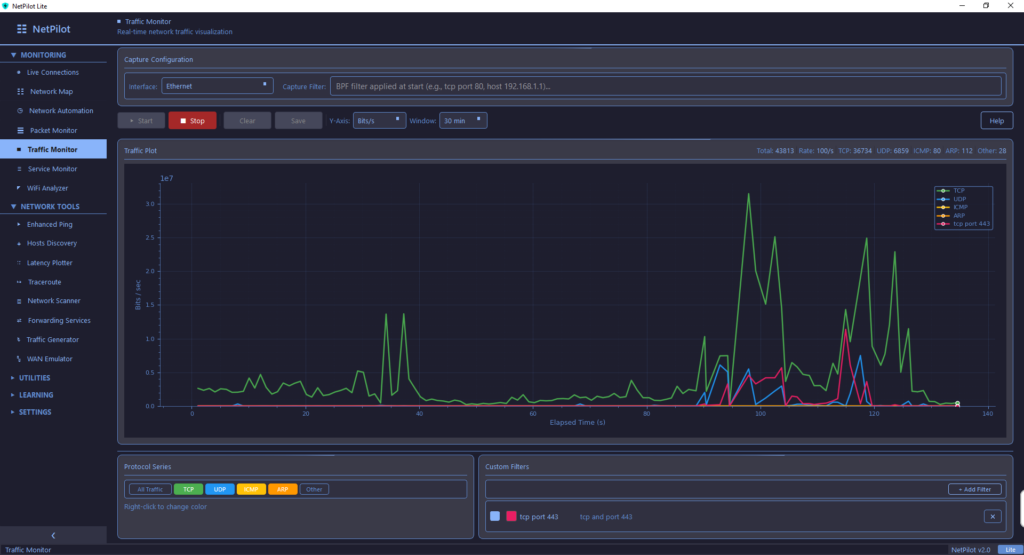
Some of the standout features include:
- Automatic network scanning that’s fast and accurate
- Clean device discovery with useful metadata
- Topology‑style visualisation without needing a subscription
- Built‑in diagnostics like ping, traceroute, DNS lookup, and more
- A modern UI that feels fresh and intuitive
For a “Lite” version, it’s surprisingly capable.
Why Netpilot Lite Fits Perfectly Into a Windows Workflow
Windows has always been a bit awkward for networking professionals. You can get the job done, but it often feels like you’re working around the OS rather than with it. Netpilot Lite changes that by giving you a proper networking dashboard right on your desktop.
Here’s how it fits into my day‑to‑day workflow:
- When I’m on a Windows laptop doing on‑site work, I can quickly map out the network without spinning up a Linux VM.
- It complements MobaXterm perfectly—Moba handles remote access, Netpilot handles discovery and visibility.
- It’s ideal for quick audits, troubleshooting, or verifying device presence.
- It’s lightweight enough to run on any machine without slowing things down.
For small businesses, home labs, or technicians who need fast visibility, it’s a no‑brainer.
Key Features That Make It Worth Installing
Below are the features that make Netpilot Lite genuinely useful:
- Network Discovery — Quickly identifies devices, IPs, hostnames, and open ports.
- Topology View — Gives you a visual map of your network layout.
- Built‑in Diagnostics — Ping, traceroute, DNS lookup, and more.
- Port Scanning — Fast scanning with clear results.
- Modern UI — Clean, responsive, and easy to navigate.
Final Thoughts
Netpilot Lite isn’t trying to compete with enterprise‑grade network management suites—and that’s exactly why it works so well. It fills the gap between basic Windows tools and expensive commercial platforms, giving technicians, home lab enthusiasts, and small business IT support a powerful, free option.
If you’re working in Windows and want a better way to visualise, diagnose, and understand your network, Netpilot Lite is absolutely worth adding to your toolkit.